Deep Dive with Gradient Boosting Machine using H2O + R (Plus Grid Search!)
Continuing with some tutorials on using R as a programming language with H2O as a processing and memory backend (two main limitations of R), we will discuss Gradient Boosting Machine and use a credit dataset from a fictitious bank called ‘Layman Brothers’.
Gradient Boosting Machine (GBM) is a supervised learning meta-algorithm generally used for classification and regression problems. The algorithmic principle behind GBM is the production of predictions/classifications derived from weak predictive models (Weak Learners), particularly decision trees, which are then combined via ensemble learning to reduce algorithmic biases.
These predictions are generated through a combination of the gradient descent meta-heuristic for parametric optimization versus minimizing a loss function, and Boosting, which involves combining several weak classifiers (Weak Learners) in series (or a meta-classifier) to combine the results of these algorithms.
As we can assume, with this heuristic combination of algorithms, especially weak learners (which provide substantial robustness to the model), we can expect a certain insensitivity to long-tail distributions that can be thick and ruin your predictions (e.g. the world income distribution where few (20%) have a lot of money and many (80%) have little), outliers (i.e. extreme events, also known as black swans), in addition to a good response to non-linearity. (Note: If you didn’t understand anything here, two great books by Nassim Taleb are Black Swan and Antifragile.)
As mentioned earlier, the dataset used here is from a fictitious bank called ‘Layman Brothers,’ a friendly allusion to Lehman Brothers; our goal is to have a credit system a bit more reliable than theirs, which isn’t a task requiring much intelligence or intellectual stamina. (Note: This dataset is originally from the UCI repository, but I’m renaming it to give a more relaxed scenic tone here in the post).
Our credit dataset has the following columns:
- ID: Transaction number
- LIMIT_BAL: Credit granted in dollars
- SEX: Gender (1 = male; 2 = female).
- EDUCATION: Client’s educational level (1 = high school; 2 = university; 3 = complete higher education; 4 = others)
- MARRIAGE: Marital status (1 = married; 2 = single; 3 = others).
- AGE: Client’s age
- PAY_X: Past payment history. Past monthly payments (from April to September 2005) were tracked as follows: PAY_1 the repayment status for September 2005, PAY_2: the repayment status for August 2005, etc. The repayment scale is: -1 = Paid on time, 1 = paid one month late, 2 = payment delayed by 2 months, 8 = payment delayed by 8 months, etc.
- BILL_AMTX: Amount of the balance not yet amortized from previous months. BILL_AMT1 = Balance not yet amortized in September 2005, BILL_AMT2 = balance not yet amortized in August 2005, etc.
- PAY_AMTX: Amount paid previously (in dollars) for the previous month. PAY_AMT1 = amount paid in September 2005, PAY_AMT2 = amount paid in August 2005, etc.
- DEFAULT: Whether the client defaulted on the loan in the following month.
With the dataset presented, let’s get to the code.
First, if you haven’t installed H2O via R or are using an outdated version, just run the code below, which will remove the old version, install all dependencies, and install H2O:
# The following two commands remove any previously installed H2O packages for R. if ("package:h2o" %in% search()) { detach("package:h2o", unload=TRUE) } if ("h2o" %in% rownames(installed.packages())) { remove.packages("h2o") } # Next, we download packages that H2O depends on. if (! ("methods" %in% rownames(installed.packages()))) { install.packages("methods") } if (! ("statmod" %in% rownames(installed.packages()))) { install.packages("statmod") } if (! ("stats" %in% rownames(installed.packages()))) { install.packages("stats") } if (! ("graphics" %in% rownames(installed.packages()))) { install.packages("graphics") } if (! ("RCurl" %in% rownames(installed.packages()))) { install.packages("RCurl") } if (! ("jsonlite" %in% rownames(installed.packages()))) { install.packages("jsonlite") } if (! ("tools" %in% rownames(installed.packages()))) { install.packages("tools") } if (! ("utils" %in% rownames(installed.packages()))) { install.packages("utils") } # Now we download, install and initialize the H2O package for R. install.packages("h2o", type="source", repos=(c("https://h2o-release.s3.amazonaws.com/h2o/rel-turing/8/R")))
Now let’s load the library and start our cluster (which in this case will still be on my notebook) with a maximum memory size of 8 GB, and it will use all processors (-1):
# Load library library(h2o)
# Start instance with all cores h2o.init(nthreads = -1, max_mem_size = "8G") # Info about cluster h2o.clusterInfo() # Production Cluster (Not applicable because we're using in the same machine) #localH2O <- h2o.init(ip = '10.112.81.210', port =54321, nthreads=-1) # Server 1 #localH2O <- h2o.init(ip = '10.112.80.74', port =54321, nthreads=-1) # Server 2
Cluster started, let’s fetch our data which is on the remote Github repository and then load it into our .hex object (H2O extension):
# URL with data LaymanBrothersURL = "https://web.archive.org/web/20230626222751/https://raw.githubusercontent.com/fclesio/learning-space/master/Datasets/02%20-%20Classification/default_credit_card.csv" # Load data creditcard.hex = h2o.importFile(path = LaymanBrothersURL, destination_frame = "creditcard.hex")
With the data loaded, let’s perform the transformation of categorical variables, and then let’s see the summary of these variables:
# Convert DEFAULT, SEX, EDUCATION, MARRIAGE variables to categorical creditcard.hex[,25] <- as.factor(creditcard.hex[,25]) # DEFAULT creditcard.hex[,3] <- as.factor(creditcard.hex[,3]) # SEX creditcard.hex[,4] <- as.factor(creditcard.hex[,4]) # EDUCATION creditcard.hex[,5] <- as.factor(creditcard.hex[,5]) # MARRIAGE # Let's see the summary summary(creditcard.hex)
As we can see from the summary(), we have some interesting basic descriptive statistics about this dataset, such as:
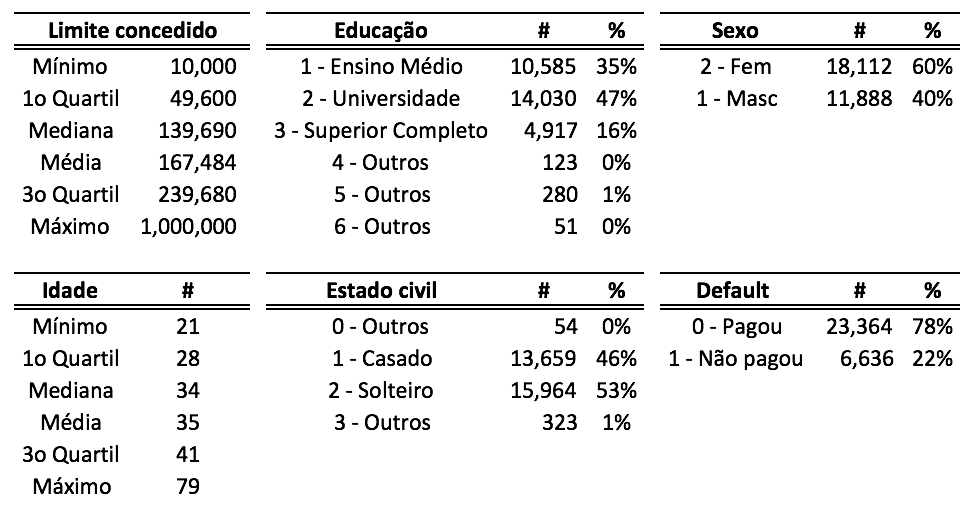
- The majority of loans were made by individuals identifying as female (60%);
- 63% of all loans were made to the population classified as university-educated or with complete higher education;
- There is a balance in marital status concerning granted loans;
- With a third quartile of 41 and very close mean and median (35 and 34), we can see that a large portion of loans were made by adults in middle age; and
- We have many individuals who took out large loans (above 239 thousand dollars), however, the average granted amount is 167 thousand dollars. Obviously, some profile analyses, correlations, and even some graphs could be included to better exemplify the demographic composition of this dataset, but since that’s not the objective of this post, it’s open for one of the 5 readers of this blog site to do it and share.
With these analyses done, let’s split our dataset into training, testing, and validation sets using the splitFrame command:
# We'll get 3 dataframes Train (60%), Test (20%) and Validation (20%) creditcard.split = h2o.splitFrame(data = creditcard.hex ,ratios = c(0.6,0.2) ,destination_frames = c("creditcard.train.hex", "creditcard.test.hex", "creditcard.validation.hex") ,seed = 12345)
# Get the train dataframe(1st split object) creditcard.train = creditcard.split[[1]] # Get the test dataframe(2nd split object) creditcard.test = creditcard.split[[2]] # Get the validation dataframe(3rd split object) creditcard.validation = creditcard.split[[3]]
To check the actual proportion of each dataset, we can use the table command to see the composition of each dataset (and especially to see if they are balanced):
# See datatables from each dataframe h2o.table(creditcard.train$DEFAULT) # DEFAULT Count # 1 0 14047 # 2 1 4030 h2o.table(creditcard.test$DEFAULT) # DEFAULT Count # 1 0 4697 # 2 1 1285 h2o.table(creditcard.validation$DEFAULT) # DEFAULT Count # 1 0 4620 # 2 1 1321
Now let’s create two objects to pass to our algorithm: one object to define our dependent variable (Y) and another to define our independent variables (X):
# Set dependent variable Y = "DEFAULT" # Set independent variables X = c("LIMIT_BAL","EDUCATION","MARRIAGE","AGE" ,"PAY_0","PAY_2","PAY_3","PAY_4","PAY_5","PAY_6" ,"BILL_AMT1","BILL_AMT2","BILL_AMT3","BILL_AMT4","BILL_AMT5","BILL_AMT6" ,"PAY_AMT1","PAY_AMT3","PAY_AMT4","PAY_AMT5","PAY_AMT6") # I intentionally removed sex variable from the model, to avoid put any gender bias inside the model. Ethics first guys! ;)
The attentive ones might notice that I removed the SEX variable. I did this intentionally as we are not going to introduce any kind of discriminatory bias into the model (Attention friends: this is a good time to seriously consider these issues of discrimination/ethics in Machine Learning models such as ethnicity, gender, etc).
Now with these objects ready, let’s train our model:
# Train model creditcard.gbm <- h2o.gbm(y = Y ,x = X ,training_frame = creditcard.train ,validation_frame = creditcard.validation ,ntrees = 100 ,seed = 12345 ,max_depth = 100 ,min_rows = 10 ,learn_rate = 0.2 ,distribution= "bernoulli" ,model_id = 'gbm_layman_brothers_model' ,build_tree_one_node = TRUE ,balance_classes = TRUE ,score_each_iteration = TRUE ,ignore_const_cols = TRUE )
Explaining some of these parameters:
- x: Vector containing the names of the model’s independent variables;
- y: Index or object representing the model’s dependent variable;
- training frame: An H2O data object (H2OFrame) containing the model’s variables;
- validation frame: An H2O data object (H2OFrame) containing the model’s variables for model validation. If empty, training data is used by default;
- ntrees: A non-negative integer defining the number of trees. The default value is 50;
- seed: Seed for the random numbers to be generated. Used for sampling reproducibility;
- max depth: User-defined value for the maximum depth of the trees. The default value is 5;
- min rows: The minimum number of rows to be assigned to each terminal node. The default is 10;
- learn rate: A number defining the model’s learning rate. Ranges from 0.1 to 1.0;
- distribution: Selects a probability distribution among AUTO, bernoulli, multinomial, gaussian, poisson, gamma, or tweedie. The default is AUTO;
- model id: A unique ID identifying the model. If not specified, it’s generated automatically;
- build tree one node: Specifies whether the model will be processed on a single node. This helps avoid network overhead, thus using fewer CPUs in the process. Ideal for small datasets, and the default is FALSE;
- balance classes: Balances the classes of the training set if the data is undersampled or imbalanced. The default is FALSE;
- score each iteration: A boolean indicating whether scoring will occur during each model iteration. The default is FALSE; and
- ignore const cols: A boolean indicating whether columns with constants will be ignored. The default is TRUE.
Some practical advice from someone who has suffered (a lot) to parameterize GBM, which you won’t get from your college professor:
a) H2O offers the validation_frame option, but if you’re more purist, the ideal is to check in the prediction step and analyze the model’s bias through error analysis (yes folks, you’ll have to do some statistics here, okay?). This not only provides finer tuning but also gives you greater understanding of the model’s errors. If this were in the mines, the people there would say it’s good for your health and builds character. Do the same.;
b) Be very judicious when adjusting the ideal number of trees (ntrees) as this significantly increases the computational cost (processing + memory) of the model. As a rule of thumb, I like to use intervals of 50 trees for each step up to a limit of 300; and as soon as I reach a middle ground, I adjust it manually via grid search until I get a tree that performs well without overfitting. This is necessary because often there’s a ridiculous increase of up to 8 hours in training time to gain a maximum of 0.01 in AUC, or a reduction of 0.005% in false positives. In summary: Go easy on the adjustments. It’s good for your health and builds character; and moreover, it saves over 20 dollars on Amazon to train a model if you’re using on-demand machines outside your infrastructure;
c) It’s the seed that will ensure your numbers are correct when you pass them to someone for code review or even before deployment. So, use it whenever possible for obvious reproducibility reasons;
d) The max depth parameter is often what I call the ‘scammer’s graveyard‘ in Machine Learning. This is because any beginner encountering this parameter for the first time will likely set the highest possible number, often almost the same number as instances in the training set (this is when the scammer doesn’t even use cross-validation to make things even prettier), which makes the tree more specific and usually leads to that overfitting. Some beginners manage to achieve overfitting even when using max depth with leave-one-out cross validation. (A small empirical tip: personally, I’ve never achieved great results with a depth exceeding 0.005% of the number of records in the training set (100/((30000/100)*70 =0.005%). I’m still trying to figure out if this is correct or not, but at least it works well for me);
e) The smaller the min rows value, the more specific the tree will be, and it might generalize less. Therefore, be very cautious with this parameter;
f) It goes without saying that a very small number can influence the processing time and model convergence, and a large number might fall into a local minimum and ruin the entire effort. Practical tip: short on time? Go with 0.35 to 0.75 in increments of 0.1. Have plenty of time? Go from 0.1 to 0.5 in increments of 0.03;
g) It’s really worth investing some brainpower to better understand the probability distributions (distribution) to choose the correct one. If you don’t have time, choose AUTO and be happy; h) Unless you’re facing network and processing contention issues, the build tree one node parameter should always be turned off;
i) If you’re using the balance classes parameter, it means your sampling work is garbage and you need the tool to do something basic, which might not be the most correct approach. I strongly recommend seriousness in the sampling process, which is the heart of any machine learning training. For very unusual sampling situations (e.g. fraud detection systems, Call Center complaint classifiers, et cetera) or due to lack of time, it’s worth using this parameter (Practical tip: if there’s a severe class imbalance (something like a 9:1 ratio), it’s best to forget other model evaluation metrics and go straight to the Matthews correlation coefficient, which is much more consistent for handling this type of scenario);
j) If you’re using the ignore const cols parameter, it’s because your preprocessing work (Feature Extraction and Feature Engineering) is garbage and might not be the best.
Model trained and parameters explained, let’s look at the model’s performance using the validation data:
# See algo performance h2o.performance(creditcard.gbm, newdata = creditcard.validation) # H2OBinomialMetrics: gbm # MSE: 0.1648487 # RMSE: 0.4060157 # LogLoss: 0.8160863 # Mean Per-Class Error: 0.3155595 # AUC: 0.7484422 # Gini: 0.4968843 # Confusion Matrix for F1-optimal threshold: # 0 1 Error Rate # 0 3988 632 0.136797 =632/4620 # 1 653 668 0.494322 =653/1321 # Totals 4641 1300 0.216294 =1285/5941 # We have an AUC of 74,84%, not so bad!
With this model, we achieved an AUC of 74.84%. Reasonable, considering we used a simple set of parametrizations.
Next, let’s check the importance of each of our variables:
# Variable importance imp <- h2o.varimp(creditcard.gbm) head(imp, 20) # Variable Importances: # variable relative_importance scaled_importance percentage # 1 EDUCATION 17617.437500 1.000000 0.380798 # 2 MARRIAGE 9897.513672 0.561802 0.213933 # 3 PAY_0 3634.417480 0.206297 0.078557 # 4 AGE 2100.291992 0.119217 0.045397 # 5 LIMIT_BAL 1852.831787 0.105170 0.040049 # 6 BILL_AMT1 1236.516602 0.070187 0.026727 # 7 PAY_AMT5 1018.286499 0.057800 0.022010 # 8 BILL_AMT3 984.673889 0.055892 0.021284 # 9 BILL_AMT2 860.909119 0.048867 0.018608 # 10 PAY_AMT6 856.006531 0.048589 0.018502 # 11 PAY_AMT1 828.846252 0.047047 0.017915 # 12 BILL_AMT6 823.107605 0.046721 0.017791 # 13 BILL_AMT4 809.641785 0.045957 0.017500 # 14 PAY_AMT4 771.504272 0.043792 0.016676 # 15 PAY_AMT3 746.101196 0.042350 0.016127 # 16 BILL_AMT5 723.759521 0.041082 0.015644 # 17 PAY_3 457.857758 0.025989 0.009897 # 18 PAY_5 298.554657 0.016947 0.006453 # 19 PAY_4 268.133453 0.015220 0.005796 # 20 PAY_2 249.107925 0.014140 0.005384
In other words, while previously educational level and marital status played an important role, in this model (with better AUC), punctuality, credit amount granted, and age have more influence.
With this improved model, we can make our predictions and save them to a .csv file for upload to a system or via API request.
# Get model and put inside a object model = best_glm # Prediction using the best model pred2 = h2o.predict(object = model, newdata = creditcard.validation) # Frame with predictions dataset_pred = as.data.frame(pred2) # Write a csv file write.csv(dataset_pred, file = "predictions.csv", row.names=TRUE)
And after finishing all the work, we can shut down our cluster:
# Shutdown the cluster h2o.shutdown() # Are you sure you want to shutdown the H2O instance running at http://localhost:54321/ (Y/N)? Y # [1] TRUE
Well folks, as you can see, using a Gradient Boosting Machine model in R with H2O is not rocket science; a little bit of parameterization caution and everything works out.
If you have questions, leave your intelligent and polite comment below or email me.
Best regards!